

When you learn programming, most of your energy goes into mastering syntax, loops, and logic. You worry about getting the code to compile and run without throwing errors. But there is a silent partner in software development that determines whether your code is actually good or just functional: readable English prose. Programs are written for computers to execute, but they are read and maintained by human beings. If your variable and function names look like a jumbled alphabet soup, your project becomes a nightmare to maintain.
Clean code is not just about indentation and spacing; it relies heavily on proper linguistic structure. When you use proper English for naming variables and functions, you turn confusing lines of code into a self-explanatory story. For students managing complex programming coursework, writing clean code is often the difference between an A grade and a failing mark. If you find yourself overwhelmed trying to clean up your script syntax before a tight university deadline, getting targeted python assignment help directly from myassignment.services can give you the structural clarity you need to format your engineering projects perfectly. Learning how parts of speech apply to coding logic will instantly elevate your code readability.
The Linguistic Roles of Classes, Variables, and Functions
To write readable code, you must treat your programming elements like parts of a sentence. In standard English grammar, nouns represent people, places, or things, while verbs represent actions. Code follows this exact same pattern.
Variables and Classes are Nouns
Variables store data, which means they represent a specific entity, value, or state. Because they hold a “thing,” variable names should always be nouns or descriptive noun phrases.
- Bad Naming: setUserData, running, calculate
- Good Naming: userData, isRunning, totalCalculation
When a classmate or professor reads your code, a noun instantly signals that this specific identifier holds information. For instance, studentName tells the reader exactly what data is inside the container.
Functions and Methods are Verbs
Functions perform actions. They calculate values, fetch data, modify states, or print reports. Because a function actively does something, its name must start with a strong, clear verb.
- Bad Naming: userData, file, totalPrice
- Good Naming: fetchUserData(), saveFile(), calculateTotalPrice()
By pairing a verb with a noun (e.g., deleteRecord()), you create an immediate mental picture of the action being performed and the object receiving that action.
The relationship between these parts of speech creates a structural framework that determines code readability. The hierarchy below illustrates how English grammar maps directly onto technical programming objects:
Plaintext
[Academic Program Blueprint]
│
├──► Nouns ──────► Classes & Objects ──► (e.g., StudentAccount)
│
├──► Noun Phrases ► Variables & States ─► (e.g., totalGradePoints)
│
└──► Active Verbs ► Functions & Methods ─► (e.g., calculateGPA())
Mastering the Grammar of Booleans
Boolean variables can only hold two values: true or false. Because of this binary nature, naming a boolean requires a specific grammatical approach. A good boolean name sounds like a question that can be answered with a simple “yes” or “no.”
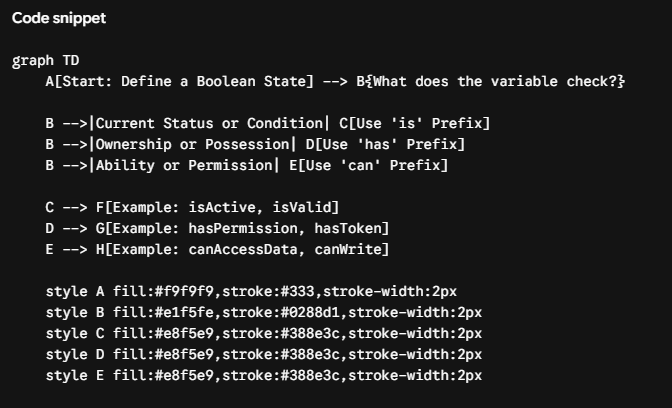
To achieve this, always prefix your boolean variables with auxiliary verbs such as is, has, can, or should.
JavaScript
// Good grammatical phrasing for binary states
let isActive = true; // Is the user active? Yes.
let hasPermission = false; // Has the user permission? No.
let canAccessData = true; // Can the user access data? Yes.
Avoid using negative prefixes in your boolean names, such as isNotComplete or hasNoData. Double negatives in programming logic (like if (!isNotComplete)) force the brain to do extra mental gymnastics, which often leads to silly coding bugs. Stick to positive, clear assertions.
The Pitfalls of Abbreviations and Slang
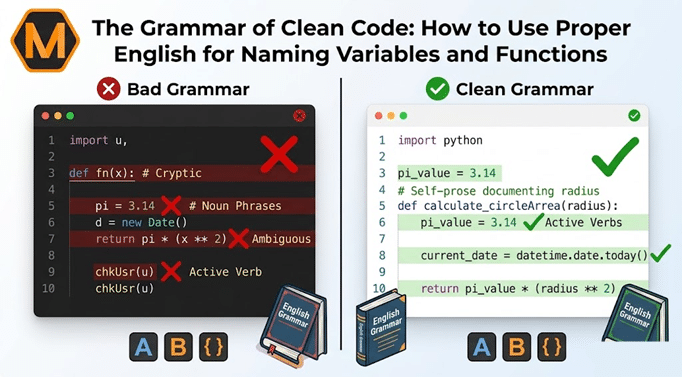
When you are in a rush to finish a programming assignment, it is incredibly tempting to use short abbreviations to save yourself a few keystrokes. You might name a variable str instead of searchString, or temp instead of temporaryTemperature.
While this might save you two seconds of typing, it costs minutes of confusion later on when you try to debug your script. Slang and text-speak have absolutely no place in clean source code. Standard English words are universally understood, whereas custom abbreviations require the reader to guess your internal thought process.
Plaintext
Unclear: let d = new Date();
Clear: let currentDate = new Date();
Unclear: function chkUsr(u) { … }
Clear: function checkUserStatus(userObject) { … }
If you are struggling to keep track of complex naming metrics while balancing multiple term papers, seeking Computer Science Assignment Help can streamline your learning process and free up time to focus on mastering core programming logic.
The Clean Code Translation Matrix
To see how poor English choices disrupt programming flow, compare how common linguistic mistakes alter the clarity of a software script. The table below displays common naming errors, explains the grammatical flaw behind them, and provides the optimized clean code solution:
| Bad Identifier | Grammatical Flaw | Impact on Code Readability | Clean Code Solution |
| dataProcessing() | Gerund (Noun-form Verb) | Confusing; sounds like a static data storage container rather than an active process. | processData() |
| valid | Isolated Adjective | Vague; does not specify what is valid or how the binary check is performed. | isValid or hasValidCredentials |
| array1, list_v2 | Arbitrary Numbering | Lazy; fails to explain the actual context or type of items stored inside the collection. | studentScores, activeUserIds |
| get_user_name_string() | Data-Type Redundancy | Wordy; includes the variable type unnecessarily when the context is already obvious. | getUserName() |
| usrTknMod | Cryptic Abbreviation | Highly ambiguous; forces external team members to guess what the letters represent. | modifyUserToken() |
4 Rules for Perfect Casing and Formatting
Different programming languages prefer different naming styles, but the underlying English rules remain identical. Understanding how to structure your words visually ensures your code looks cohesive and professional.
1. camelCase for Variables and Functions
In languages like JavaScript, Java, and C#, multi-word names are written in camelCase. The first letter is lowercase, and each subsequent word starts with a capital letter.
- let userbillingaddress = “…” (Incorrect – unreadable wall of text)
- let userBillingAddress = “…” (Correct – easy to parse visually)
2. snake_case for Python and Database Columns
Python developers prefer snake_case, where all letters are lowercase and words are separated by underscores.
- def calculate_average_grade(student_list):
The underscore acts exactly like a space in a printed English sentence, separating distinct ideas cleanly.
3. PascalCase for Class Names
Classes represent the overarching blueprints of your program. To distinguish them from standard variables and functions, capitalize every single word, including the first one.
- class StudentEnrollmentManager { … }
4. Avoid Redundant Words
Do not include the data type or context inside the name if it is already obvious. This is a common linguistic error called a redundancy.
- Redundant: let studentNameString = “Alice”;
- Clean: let studentName = “Alice”;
Linguistic Scope: Naming Rules Across Contexts
The location of a variable or function within a script alters how detailed its name needs to be. Grammatically speaking, a small context requires less description, while a global context demands high linguistic specificity.
Plaintext
[GLOBAL SCOPE] ──► High Descriptive Depth ──► (e.g., applicationDatabaseConnectionPool)
│
[FILE SCOPE] ──► Moderate Descriptive Depth ──► (e.g., userProfileForm)
│
[LOCAL SCOPE] ──► Low Descriptive Depth ────► (e.g., index, element)
Short-Lived Local Variables
For variables that only exist inside a short, three-line loop, standard shorthand is acceptable. For example, using i for an array index or e for an error catch block is perfectly fine because the reader can see the entire lifecycle of that variable at a single glance.
Global Identifiers and Configuration Files
If a variable is accessed across multiple files or modules, its name must be incredibly explicit. A variable named config at a global level is frustratingly vague. Instead, use a fully descriptive noun phrase like systemDatabaseConfiguration. The broader the reach of the identifier, the more precise the English syntax must be.
Why Code Readability Matters for Academic Success
In computer science courses, your professor does not just run your code through an automated test grader to see if it works. Humans look at your project layout to evaluate your professional code style.
Messy names suggest disorganized thinking. On the flip side, when an educator opens your script and sees perfectly structured English names, they can instantly follow your logical flow. Clean grammar shows that you care about craftsmanship, structure, and professional standards, which naturally translates into higher grades.
Python
# Unreadable Code
def fn(x):
a = 3.14
return a * (x ** 2)
# Self-Documenting, Clean Code
def calculate_circle_area(radius):
pi_value = 3.14
return pi_value * (radius ** 2)
Look at the difference between those two Python functions. The second example tells you exactly what it does without requiring a single explanatory comment block. The code speaks for itself because the English words chosen are precise and grammatically sound.
Advanced Naming Paradigms: Getting the Details Right
As your development projects grow in complexity, you will run into specific scenarios that require distinct linguistic patterns. Mastering these advanced rules will keep your codebase clean and uniform across large assignments.
Naming Collections and Arrays
When a variable holds multiple items (like an array or a list), the identifier must be plural. Using a singular noun for a collection creates a massive mismatch in expectations.
- Confusing: let student = [“Alice”, “Bob”, “Charlie”];
- Clear: let studentList = [“Alice”, “Bob”, “Charlie”]; or let students = [“Alice”, “Bob”, “Charlie”];
Matching Symmetry in Pairs
If your code has functions or variables that perform opposite tasks, use exact antonyms to maintain mathematical and linguistic symmetry. Mixing up vocabulary pairs makes code hard to navigate.
- Asymmetric Pairs: openFile() and close_connection(), getAge() and set_new_age()
- Symmetric Pairs: openFile() and closeFile(), startProcess() and stopProcess(), getAge() and setAge()
Using consistent antonym pairs allows a developer to predict exactly what the matching function is named without searching through the entire directory.
Final Checklist for Your Next Programming Project
Before you package up your next programming file and hit submit, take five minutes to do a quick linguistic review of your codebase. Ask yourself these four straightforward questions:
- Are all my variables nouns or adjective-noun combinations?
- Do all my function names begin with a clear, active verb?
- Did I avoid confusing shorthand abbreviations like calc, info, or temp?
- Are my boolean variables framed as clear, positive questions using prefixes like is or has?
Writing clean code is a habit that takes practice. By treating your programming scripts with the same grammatical respect you give to a formal English essay, you will write bugs less frequently, collaborate with classmates more efficiently, and become a far more effective software developer.
Frequently Asked Questions
1. Why does my choice of vocabulary matter if my software runs perfectly?
While compilers only require correct code syntax, humans must read, update, and evaluate your files. Using clear, grammatically correct language transforms obscure logic into a self-explanatory narrative, reducing debugging time and making collaboration seamless.
2. How do I decide whether an identifier should be a noun or a verb?
Use nouns or descriptive noun phrases for elements that store data, as they represent specific entities or objects. Use clear, active verbs for elements that perform operations, as they represent executable actions.
3. What is the proper way to handle true or false indicators?
Frame the identifier as a direct question that can be answered with a simple yes or no. Begin the name with positive auxiliary prefixes like is, has, or can, and completely avoid confusing double negatives.
4. When can I safely use brief abbreviations in my project script?
Brief shorthand should be reserved strictly for temporary, short-lived elements inside isolated scopes, like a minor loop index. For any global identifier accessed across multiple modules, always spell out the words completely.
About The Author
Min Seow is a dedicated technical content writer at MyAssignment.services, who specializes in transforming intricate academic concepts and programming principles into highly accessible guides for students worldwide.